
Showing posts with label Launcher. Show all posts
Showing posts with label Launcher. Show all posts
Day after Night Live Wallpaper Full Edition portraits the four significant moments of the day, from dawn to dusk, followed by a magnificent artistically interpreted night scene.
Savor an intense blend of graphics with relaxing sounds that bring peace and comfort in any stressful situation. Between each times of day, the scene will smoothly fade from one time of the day to the other.
Enjoy the dynamic environment with constant movement of particles such as dust and flower fluff at day or fireflies at night. See the sun rise and set along the course of the day. Enjoy colorful butterflies during the sunny day accompanied by sparrows and storks. The night sky is dominated by an impressive artistic moon, but also by twinkling stars. Every part of the day can experience weather changes, such as clouds and rain, but also wind which interacts with parts of the scene, such as the particles and the tree.
The app is also optimized for saving battery, CPU and GPU memory. This came with a little cost on the visual experience but we hope that it is unnoticeable.
Please, note:
* We recommend to install the free version first, just to be sure that the app runs properly on your device. *
* The transitions of the time of the day do not adapt to the user' location. *
* If the application runs slow on your device, disable the particles and lower the general quality setting. *
The full version includes:
All times of the day:
- Full weather system. The user can utilize a location based weather system which synchronizes with the local weather, a random weather generator but can also specify his own weather preferences.
- Raindrops and steam on the screen during the rain
- Toggle-able ambient sounds for all the moments of the day
- Auto-scroll option
- Disable swipe navigation
Night:
- Fireflies
- Dynamic star particles
- Bats
- Shooting stars
Day:
- Storks and sparrows
- Flower dust and fluff
- Rainbow
- Procedurally colored butterflies
Almost all the presented features have options to enable or disable them. If you would like to watch our video demos check our facebook page.
Device requirements:
We recommend devices that are less than three years-old. The oldest device we have tested on was a Samsung Galaxy Ace, a four year-old device. The overall performance was good at high settings with particles enabled.
Permissions:
Location permission, used for the weather API that requires it. Internet permission to query the weather state at your location. We do not collect ANY of your personal information!
If you find a bug do not hesitate to e-mail us, a fix will be delivered very soon. If any other problem or crash occurs or your are not satisfied with the application, do not hesitate to e-mail us for a refund!
What's in this version : (Updated : July 31, 2015)
Moon phases are here!
- Moon phase set based on device data.
- Moon phase manually set.
- Alternative moon path.
- Multiple moon display modes.
- Fixed a crash that we received on our exceptions email. Thank you very much for reporting it!
Stand by for location based sunrise and sunset.
Required Android O/S : 2.3.3 and up
https://play.google.com/store/apps/details?id=creative.landscape.daynight.full


Download Links
https://dailyuploads.net/kkkfvgo0mqr7
http://www.gboxes.com/0j02nvs0z5us/Dys.c_Kn1ght.sc_45s8c.rar
http://www.indishare.com/8yajriddhuqv
http://ul.to/43zq99c0
http://ozofiles.com/irvks03u1x6y/Dys.c_Kn1ght.sc_45s8c.rar.html
Savor an intense blend of graphics with relaxing sounds that bring peace and comfort in any stressful situation. Between each times of day, the scene will smoothly fade from one time of the day to the other.
Enjoy the dynamic environment with constant movement of particles such as dust and flower fluff at day or fireflies at night. See the sun rise and set along the course of the day. Enjoy colorful butterflies during the sunny day accompanied by sparrows and storks. The night sky is dominated by an impressive artistic moon, but also by twinkling stars. Every part of the day can experience weather changes, such as clouds and rain, but also wind which interacts with parts of the scene, such as the particles and the tree.
The app is also optimized for saving battery, CPU and GPU memory. This came with a little cost on the visual experience but we hope that it is unnoticeable.
Please, note:
* We recommend to install the free version first, just to be sure that the app runs properly on your device. *
* The transitions of the time of the day do not adapt to the user' location. *
* If the application runs slow on your device, disable the particles and lower the general quality setting. *
The full version includes:
All times of the day:
- Full weather system. The user can utilize a location based weather system which synchronizes with the local weather, a random weather generator but can also specify his own weather preferences.
- Raindrops and steam on the screen during the rain
- Toggle-able ambient sounds for all the moments of the day
- Auto-scroll option
- Disable swipe navigation
Night:
- Fireflies
- Dynamic star particles
- Bats
- Shooting stars
Day:
- Storks and sparrows
- Flower dust and fluff
- Rainbow
- Procedurally colored butterflies
Almost all the presented features have options to enable or disable them. If you would like to watch our video demos check our facebook page.
Device requirements:
We recommend devices that are less than three years-old. The oldest device we have tested on was a Samsung Galaxy Ace, a four year-old device. The overall performance was good at high settings with particles enabled.
Permissions:
Location permission, used for the weather API that requires it. Internet permission to query the weather state at your location. We do not collect ANY of your personal information!
If you find a bug do not hesitate to e-mail us, a fix will be delivered very soon. If any other problem or crash occurs or your are not satisfied with the application, do not hesitate to e-mail us for a refund!
What's in this version : (Updated : July 31, 2015)
Moon phases are here!
- Moon phase set based on device data.
- Moon phase manually set.
- Alternative moon path.
- Fixed a crash that we received on our exceptions email. Thank you very much for reporting it!
Stand by for location based sunrise and sunset.
Required Android O/S : 2.3.3 and up
https://play.google.com/store/apps/details?id=creative.landscape.daynight.full


Download Links
https://dailyuploads.net/kkkfvgo0mqr7
http://www.gboxes.com/0j02nvs0z5us/Dys.c_Kn1ght.sc_45s8c.rar
http://www.indishare.com/8yajriddhuqv
http://ul.to/43zq99c0
http://ozofiles.com/irvks03u1x6y/Dys.c_Kn1ght.sc_45s8c.rar.html
Nova Launcher Prime v4.0.2 + TeslaUnread 4.0.1 Proper
Requirements: 4.1+
Overview: The highly customizable, performance driven, home screen
Accept no substitutes! Nova Launcher is the top launcher for modern Android, embracing full Material Design throughout.
Nova Launcher replaces your home screen with one you control and can customize. Change icons, layouts, animations and more.
or my money, Nova Launcher is the best of the AOSP-style launchers available in Android. --Android Police
Nova Launcher has some very capable hands behind it --Phandroid
Our favorite is Nova Launcher, which strikes a great perfect balance between incredible performance and high customizability without getting too gimmicky and difficult to use --Lifehacker
Chock full of features you won't find in the stock launcher, and comes highly recommended --Android Central
• Icon Themes - Find thousands of icon themes for Nova Launcher on the Play Store
• Subgrid positioning - Much greater control than standard launchers, Nova Launcher allows you to snap icons or widgets half way through the desktop grid cells
• Color controls - for labels, folders, unread badges, drawer tabs and backgrounds
• Customize App Drawer - Custom tabs, Vertical or Horizontal scrolling, Custom effects
• Improved Widget Drawer - Widgets grouped by app makes it much faster to use
• Infinite scroll - Never far from your favorite page, loop through the desktop or drawer continuously
• Backup/Restore - Sophisticated backup/restore system allowing you to backup your desktop layout and launcher settings
• Scrollable Dock - Create multiple docks and scroll between them
• Widgets in dock - Place any widget in your dock, such as a 4x1 music player widget
• Import Layout - No need to rebuild your desktop from scratch, Nova Launcher can import from most popular launchers. Including the one that came with your phone.
• Fast - Nova Launcher is highly optimized to do it's work quickly and quietly, keeping the animations smooth and letting you use your phone as fast as you can move your fingers.
Nova Launcher Prime
Unlock the following extras by purchasing Nova Launcher Prime
• Gestures - Swipe, pinch, double tap and more on the home screen to open your favorite apps
• Unread Counts - Never miss a message. Unread count badges for Hangouts, SMS, Gmail and more using the TeslaUnread plugin
• Custom Drawer Groups - Create new tabs or folders in the app drawer
• Hide Apps - Keep a clean app drawer by hiding never used apps
• Icon Swipes - Set custom actions for swiping on app shortcuts or folders
• More scroll effects - Such as Wipe, Accordion, and Throw
WHAT'S NEW
4.0.2
Add multiple apps at once, Widgets > "Apps or folder"
Add Direct Dial shortcut for SGS6
Fix LG G4 unable to open Messaging app
Fix transparent bars on Huawei Lollipop
Fix FCs
Optimizations
Update translations
INSTRUCTIONS:
1. Uninstall previous version of Nova Launcher and Tesla Unread plugin
2. Install Nova Launcher and the Tesla Unread plugin from my package (not from Google Play).
3. Enjoy!
This version fixed compatibility issues with TeslaUnread and WidgetLocker Lockscreen
This is patched version, fully unlocked prime funstions. No prime key is required.
If your ROM came with Nova Launcher you'll have to remove it before installing this.
This app has no advertisements


Download Link
https://userscloud.com/e0fqsq317trb
Requirements: 4.1+
Overview: The highly customizable, performance driven, home screen
Accept no substitutes! Nova Launcher is the top launcher for modern Android, embracing full Material Design throughout.
Nova Launcher replaces your home screen with one you control and can customize. Change icons, layouts, animations and more.
or my money, Nova Launcher is the best of the AOSP-style launchers available in Android. --Android Police
Nova Launcher has some very capable hands behind it --Phandroid
Our favorite is Nova Launcher, which strikes a great perfect balance between incredible performance and high customizability without getting too gimmicky and difficult to use --Lifehacker
Chock full of features you won't find in the stock launcher, and comes highly recommended --Android Central
• Icon Themes - Find thousands of icon themes for Nova Launcher on the Play Store
• Subgrid positioning - Much greater control than standard launchers, Nova Launcher allows you to snap icons or widgets half way through the desktop grid cells
• Color controls - for labels, folders, unread badges, drawer tabs and backgrounds
• Customize App Drawer - Custom tabs, Vertical or Horizontal scrolling, Custom effects
• Improved Widget Drawer - Widgets grouped by app makes it much faster to use
• Infinite scroll - Never far from your favorite page, loop through the desktop or drawer continuously
• Backup/Restore - Sophisticated backup/restore system allowing you to backup your desktop layout and launcher settings
• Scrollable Dock - Create multiple docks and scroll between them
• Widgets in dock - Place any widget in your dock, such as a 4x1 music player widget
• Import Layout - No need to rebuild your desktop from scratch, Nova Launcher can import from most popular launchers. Including the one that came with your phone.
• Fast - Nova Launcher is highly optimized to do it's work quickly and quietly, keeping the animations smooth and letting you use your phone as fast as you can move your fingers.
Nova Launcher Prime
Unlock the following extras by purchasing Nova Launcher Prime
• Gestures - Swipe, pinch, double tap and more on the home screen to open your favorite apps
• Unread Counts - Never miss a message. Unread count badges for Hangouts, SMS, Gmail and more using the TeslaUnread plugin
• Custom Drawer Groups - Create new tabs or folders in the app drawer
• Hide Apps - Keep a clean app drawer by hiding never used apps
• Icon Swipes - Set custom actions for swiping on app shortcuts or folders
• More scroll effects - Such as Wipe, Accordion, and Throw
WHAT'S NEW
4.0.2
Add multiple apps at once, Widgets > "Apps or folder"
Add Direct Dial shortcut for SGS6
Fix LG G4 unable to open Messaging app
Fix transparent bars on Huawei Lollipop
Fix FCs
Optimizations
Update translations
INSTRUCTIONS:
1. Uninstall previous version of Nova Launcher and Tesla Unread plugin
2. Install Nova Launcher and the Tesla Unread plugin from my package (not from Google Play).
3. Enjoy!
This version fixed compatibility issues with TeslaUnread and WidgetLocker Lockscreen
This is patched version, fully unlocked prime funstions. No prime key is required.
If your ROM came with Nova Launcher you'll have to remove it before installing this.
This app has no advertisements


Download Link
https://userscloud.com/e0fqsq317trb
Nova Launcher Prime v4.0.2 + TeslaUnread 4.0.1 Proper
Requirements: 4.1+
Overview: The highly customizable, performance driven, home screen
Accept no substitutes! Nova Launcher is the top launcher for modern Android, embracing full Material Design throughout.
Nova Launcher replaces your home screen with one you control and can customize. Change icons, layouts, animations and more.

or my money, Nova Launcher is the best of the AOSP-style launchers available in Android. --Android Police
Nova Launcher has some very capable hands behind it --Phandroid
Our favorite is Nova Launcher, which strikes a great perfect balance between incredible performance and high customizability without getting too gimmicky and difficult to use --Lifehacker
Chock full of features you won't find in the stock launcher, and comes highly recommended --Android Central
• Icon Themes - Find thousands of icon themes for Nova Launcher on the Play Store
• Subgrid positioning - Much greater control than standard launchers, Nova Launcher allows you to snap icons or widgets half way through the desktop grid cells
• Color controls - for labels, folders, unread badges, drawer tabs and backgrounds
• Customize App Drawer - Custom tabs, Vertical or Horizontal scrolling, Custom effects
• Improved Widget Drawer - Widgets grouped by app makes it much faster to use
• Infinite scroll - Never far from your favorite page, loop through the desktop or drawer continuously
• Backup/Restore - Sophisticated backup/restore system allowing you to backup your desktop layout and launcher settings
• Scrollable Dock - Create multiple docks and scroll between them
• Widgets in dock - Place any widget in your dock, such as a 4x1 music player widget
• Import Layout - No need to rebuild your desktop from scratch, Nova Launcher can import from most popular launchers. Including the one that came with your phone.
• Fast - Nova Launcher is highly optimized to do it's work quickly and quietly, keeping the animations smooth and letting you use your phone as fast as you can move your fingers.
Nova Launcher Prime
Unlock the following extras by purchasing Nova Launcher Prime
• Gestures - Swipe, pinch, double tap and more on the home screen to open your favorite apps
• Unread Counts - Never miss a message. Unread count badges for Hangouts, SMS, Gmail and more using the TeslaUnread plugin
• Custom Drawer Groups - Create new tabs or folders in the app drawer
• Hide Apps - Keep a clean app drawer by hiding never used apps
• Icon Swipes - Set custom actions for swiping on app shortcuts or folders
• More scroll effects - Such as Wipe, Accordion, and Throw
WHAT'S NEW
4.0.2
Add multiple apps at once, Widgets > "Apps or folder"
Add Direct Dial shortcut for SGS6
Fix LG G4 unable to open Messaging app
Fix transparent bars on Huawei Lollipop
Fix FCs
Optimizations
Update translations
INSTRUCTIONS:
1. Uninstall previous version of Nova Launcher and Tesla Unread plugin
2. Install Nova Launcher and the Tesla Unread plugin from my package (not from Google Play).
3. Enjoy!
This version fixed compatibility issues with TeslaUnread and WidgetLocker Lockscreen
This is patched version, fully unlocked prime funstions. No prime key is required.
If your ROM came with Nova Launcher you'll have to remove it before installing this.
This app has no advertisements
Download
https://userscloud.com/e0fqsq317trb
Requirements: 4.1+
Overview: The highly customizable, performance driven, home screen
Accept no substitutes! Nova Launcher is the top launcher for modern Android, embracing full Material Design throughout.
Nova Launcher replaces your home screen with one you control and can customize. Change icons, layouts, animations and more.
or my money, Nova Launcher is the best of the AOSP-style launchers available in Android. --Android Police
Nova Launcher has some very capable hands behind it --Phandroid
Our favorite is Nova Launcher, which strikes a great perfect balance between incredible performance and high customizability without getting too gimmicky and difficult to use --Lifehacker
Chock full of features you won't find in the stock launcher, and comes highly recommended --Android Central
• Icon Themes - Find thousands of icon themes for Nova Launcher on the Play Store
• Subgrid positioning - Much greater control than standard launchers, Nova Launcher allows you to snap icons or widgets half way through the desktop grid cells
• Color controls - for labels, folders, unread badges, drawer tabs and backgrounds
• Customize App Drawer - Custom tabs, Vertical or Horizontal scrolling, Custom effects
• Improved Widget Drawer - Widgets grouped by app makes it much faster to use
• Infinite scroll - Never far from your favorite page, loop through the desktop or drawer continuously
• Backup/Restore - Sophisticated backup/restore system allowing you to backup your desktop layout and launcher settings
• Scrollable Dock - Create multiple docks and scroll between them
• Widgets in dock - Place any widget in your dock, such as a 4x1 music player widget
• Import Layout - No need to rebuild your desktop from scratch, Nova Launcher can import from most popular launchers. Including the one that came with your phone.
• Fast - Nova Launcher is highly optimized to do it's work quickly and quietly, keeping the animations smooth and letting you use your phone as fast as you can move your fingers.
Nova Launcher Prime
Unlock the following extras by purchasing Nova Launcher Prime
• Gestures - Swipe, pinch, double tap and more on the home screen to open your favorite apps
• Unread Counts - Never miss a message. Unread count badges for Hangouts, SMS, Gmail and more using the TeslaUnread plugin
• Custom Drawer Groups - Create new tabs or folders in the app drawer
• Hide Apps - Keep a clean app drawer by hiding never used apps
• Icon Swipes - Set custom actions for swiping on app shortcuts or folders
• More scroll effects - Such as Wipe, Accordion, and Throw
WHAT'S NEW
4.0.2
Add multiple apps at once, Widgets > "Apps or folder"
Add Direct Dial shortcut for SGS6
Fix LG G4 unable to open Messaging app
Fix transparent bars on Huawei Lollipop
Fix FCs
Optimizations
Update translations
INSTRUCTIONS:
1. Uninstall previous version of Nova Launcher and Tesla Unread plugin
2. Install Nova Launcher and the Tesla Unread plugin from my package (not from Google Play).
3. Enjoy!
This version fixed compatibility issues with TeslaUnread and WidgetLocker Lockscreen
This is patched version, fully unlocked prime funstions. No prime key is required.
If your ROM came with Nova Launcher you'll have to remove it before installing this.
This app has no advertisements
Download
https://userscloud.com/e0fqsq317trb

Metro UI Launcher 10 Pro v1.0.8 [Patched] | 6 Mb
Requirements: 3.0 and up
Overview: Metro Launcher Pro now on your Android Device. Manage your homescreen in the unique Metro design. (Inspired by Windows 8 Modern UI ®)
Metro Launcher now on your Android Device. Manage your homescreen in the unique Metro design.
(Inspired by Windows 10®) .
Features:
# Beautiful homescreen in tablet mode
# Personalize your homescreen with your favorite Apps, Contacts and Widgets.
# Rearrange tiles with drag'n'drop.
# Sidebar in Charmbar®-style
# Fast access to your main functions: Internet, Store, Contacts, etc.
# See your recent opened apps
# Customize your background with (live) wallpaper
# Change displayed account name and image
# Optimized for tablets and smartphones
# Quick-search via sidebar
# Customize your launcher with lot of settings
Other than in other launchers, this launcher is not imitating Windows Phone®, but a similar design to the Windows 10 tablet mode®
Please keep in mind that this launcher is still in development
Stay tuned for upcoming changes
FAQ:
#How can I start this App?
- In fact it's an launcher, you can simply start it with the home-button and select this Launcher.
If you already selected a other default launcher, you first have to clear the default config in your settings.
# How can I add apps to homescreen?
- Open the appdrawer by click on "Start". If you long press on an app, you can add it to your homescreen with "Pin to Start".
# How can I open Settings of this App?
There are two ways:
- Open the charmbar and select settings.
- Click on the account on the top left corner and select “Settings”
# How to customize & rearrange tiles:
- Long press on a tile. A bar at the bottom appears, where the tile can be configured.
# How can I open the Charmbar®?
- Simple slide on the homescreen your finger from the right screen edge to the middle of the screen. Then the Charmbar® should be appear on the right side.
# How I can reach all my apps.
- There are some methods:
1.) Click on "Start" on the left top corner of the home screen
2.) Open your Charmbar and select "Search" or "Start"
3.) Swipe from the buttom
#Where is the desktop?
- We won't provide any kind of Windows Desktop, because this is only the Metro Modern UI® in tablet mode
# How can I uninstall this launcher?
- Go to your settings, select this application and uninstall application
# I have a lot of suggestions and improvements
- Please leave a comment in the store,community or contact us via mail. Thank you very much
# Can it handle multi windows?
- NO, this functionality cannot be supported in our launcher
# Can it run Windows 10 apps?
- NO, this an ANDROID launcher (homescreen replacement)
# Why you don't make it like the original Windows 10?
- We don't want to clone a Windows 10 for Android, but provide the Metro interface for your Android Homescreen. There won't be any Desktop implementation. Also, not every functionality can be provided, because this is NOT Windows 10 ®.
This app has no advertisements
Play store
https://play.google.com/store/apps/details?id=com.mss.metro10.launcher.pro

Title: Launcher 10 Prime
Version: v3.3.0
Android: 4.1+
Launcher 10 is an elegant replacement of stock home screen given by OEM.for the first time ever,there are integrated weather effects,which show every fine detail at a realistic level.this is a next gen launcher which eases your experience with the user interface through various cool customisations.
1. Weather effects
•Snow -This effect is as real as it gets, seeing the snow shed on to the icons. It will make you remember those snowy winter nights when you had 10 layers of cloth on you and still felt cold. In the same way, Launcher 10 produces that chilly, snowy effect without heating your device up
•Rain -You can relive the moments when you used to jump and splash about in the drizzles, and also experience an excellent depiction of rain sliding over the app icons, just like a droplet over a leaf..
•Thunderstorms be amazed by the level of detail present in Launcher 10, as you watch Zeus, the Greek God of Thunder, show off his fury right on your apps !
•Mist -let the mist form on your display showing the perfect experience of the weather change.
•Cloudy -watch,as clouds fly over your icons.
•Sunny -experience the power of sun,as light rays touch your screen and you can experience the glares as you gaze on to the screen.
•Windy -these dandelions are so fickle that they move in the direction of your scroll.
2.Material Design - Keeping up with the trend launcher 10 is a fully Material designed launcher, keeping you updated with the latest trends of Android fashion. With Lollipop's App Drawer Transitions, All new Materialistic Animations, A fresh Lollipop theme, Folder Animations, Touch animations, etc., you get to enjoy the sweet, savoury goodness of Android Lollipop right in your home screen !
3..Unique Drawer Transition effects - All new animations for that extra edgy look for your device ! In a brand new Launcher that has been designed with you, the user, in mind, we bring you the latest, great and most innovative animations that you'll ever experience in your device ! Cool, attractive transitions like Crystal, Glow wave, bubble, etc. are all present here ! so you'll never get bored !
-Custom Grid size in Desktop and App drawer
-Customisable rows and columns in desktop and drawer
-Scrollable Dock
-Keep all your favorite apps on the dock, with up to 7 icons per page and up to 3 pages.
-Tens of transition effects
-Swipe to right (from first page) to Any app and then swipe back to launcher(like in Google now and HTC blinkfeed)
-Folder customisability including its transition animation while opening
-Backup/Restore in advanced settings
-Export your settings and layout before a wipe to quickly get back up and running.
WHAT'S NEW
VERSION_3.3.0
-Fixed force closes
VERSION_3.2.9
-Fixed app icon movement in tablets
VERSION_3.2.8
-Fixed covers in dock
-Fixed Edit icon problem
-Fixed problem of icon label color in folders
-Fixed unread counts
VERSION_3.2.7
-Fixed welcome screen bug that was reported by some users.
VERSION_3.2.5
-Minor bug fixes
VERSION_3.2.4
-Fixed Force close on enabling infinite scrolling on desktop
Screen:


Download Link:

Title: Nova Launcher Prime
Version: v4.0.1
Android: 4.1+
Type: Application
Features include:
Color Themes
Change the ascent color of the launcher, full color picker support
Icon Themes
Apply ADW or Go launcher icon themes to all app icons
Scrollable Dock (for Tablets and Phones)
Keep all your favorite apps on the dock, with up to 7 icons per page and up to 3 pages.
Customizable App Drawer:
Transparency
Scrolling style, choose between horizontal paginated or vertical continuous
Scroll Effects
Enjoy eye candy when scrolling your desktop and drawer. Effects include Cube and Cardstack and more for Prime users.
Infinite Scroll
Never be far from your favorite page, loop through your desktop continuously.
Folder Icons
You can chose a background, preview style or even replace the whole icon.
Backup/Restore
Export your settings and layout before a wipe to quickly get back up and running.
Widgets in dock
Add any 1×1 widget to the dock
Widget Overlapping
Overlap on resize or placement, long-press to send to back or bring to front
Bulk Add
Add multiple apps to the desktop or a folder at once
Activities shortcut
Select hidden activities from your favorite apps
Nova Launcher Prime Features (Paid version)
Nova Launcher Prime unlocks the following features in Nova Launcher:
Drawer Groups:
-Folders in App Drawer
-Unlimited custom tabs
-Organize apps into tabs and folders in the app drawer
Gestures
Quickly start Nova Actions or Apps from gestures on the desktop, such as pinching, swiping or two-finger swiping.
Hide Apps
Keep a clutter free drawer by hidding never used apps.
Dock Swipes
Get more use out of your dock apps by setting swipe-actions
Unread Counts
Never miss an email. Unread count badges for SMS, Missed calls and Gmail. Counts show in the dock, desktop, drawer and folders.
What’s in this version : (Updated : May 26, 2015)
-Fix keyboard for drawer search
-Adjust drawer tab width
-Fixes
Screen:


Download Link:

Title: Hola Launcher
Version: v1.8.1
Android: 2.3+
Description:
Personalize your Android with this small, light-weight, and easy-to-use alternative to your default home launcher.
We believe less is more! We believe there is beauty in simplicity!
Hola Launcher is only 2MB large, making it quick to download and easy to install. We've designed it to minimize its memory usage (resource footprint) so your phone stays fast and responsive, while providing the most important features people need. At the same time, we've focused on a clean and simple user experience that you can further customize with beautiful themes and wallpapers.
Hola Launcher: Smaller, yet bigger!
FEATURES:
● Hola Shine - A simple swipe from a bottom corner opens a smart menu of your frequently used apps and settings.
● Hola Boost - Free up memory (RAM) and further speed up your phone with a single tap!
● Hola Box - Protect your privacy by swiping up with two fingers to hide apps you don't want displayed on your desktop.
● Search - Swipe down on your screen to quickly find apps, contacts, or websites. You can also use voice search!
● Personalize - Download, install, and enjoy free high-quality themes, wallpapers, and fonts. Updated every Friday!
● Intercept - Keep your desktop clean and clutter-free by manually approving any shortcuts added to your desktop!
● Notifications - Never miss an important message again from your friends and family with home screen icon notifications.
● Screen Lock - Double-tap your desktop to lock your phone's screen, freeing up and extending your power button's life.
● Weather Forecast - Conveniently see weather forecast information for the next 6 days.
● Priority Apps - Place the apps you use most on your default home screen, so they launch faster.
● Smart Folders - Keep your apps organized with specific folders for Games, Themes, Tools, Lifestyle, Social media, etc.
...and much more! Download Hola Launcher and see what other features and delights you can find!

What's New:
For 1.8.1, we give you more dazzle and more control!
1. More fun weather widget animations!
2. Added search history in weather widget and setting to disable animations (aw, but they're so fun!).
3. You can now add your own favorite sites to the Search page.
4. Revamped the look and feel of Hola Boost+ so it has more + obviously!
Screen:


Download Link:

This is the ultimate bundle, no compromise, simply the most powerful and configurable launcher for Android. Lightning is the only launcher with scripting support, allowing an incredible flexibility with the use of JavaScript.Unlike most traditional launchers, Lightning lets you place items everywhere on the desktop, not only to the left or right sides, but also on pages above and below. Think at the desktop as an unlimited canvas extending in both horizontal and vertical directions instead of a strip, and you will get the idea.This mean: as many pages as you need, more space for your apps, and faster navigation.Lightning is loaded with powerful features, such as being able to put widgets in folders (and even other folders for hierarchical navigation), or letting you freely move, scale and rotate any items (note: detach the item from the grid to enable rotate/scale). Any object can be pinned (docked) anywhere. Much more has to be discovered in the app (panels, styles, stop points for scrolling or panels to name a few).
What's New:
Enhanced app drawer, with the ability to create folders, hide apps, change the style in all ways, view running apps, most frequently used, recently installed, direct shortcuts to kill or uninstall apps… and more !
Included lock screen management: select one of your Lightning desktop to be used as the lock screen.
Support for configuring up to 100 distinct desktops, with customizable label and icon, for the purpose of managing multiple independent setups (personal, professional, for kids, etc.)
Built-in configurable messaging notifications (highly customizable badge for sms, missed calls, unread gmails)
Full scripting support, thanks to the easy to use and well known JavaScript language
App killer available from everywhere: long tap on an icon, select kill, et voilà.
Built-in per desktop wallpaper, available in the app drawer too.


Download
http://up.media1fire.com/58dwz1vd4csu
http://rapidgator.net/file/571db1a4c7aa033a9291f0f4a8912427
http://ul.to/ib48v4er
http://rapidgator.net/file/571db1a4c7aa033a9291f0f4a8912427
http://ul.to/ib48v4er

Crius is an elegant Home and Lock screen clock and weather widget brought to you by XDA Recognized Developer EatHeat.
This is based on the CyanogenMod cLock widget but backported to lower versions. Currently, the Calendar Settings are not supported but it will be added back later.
Visit the XDA thread here: http://forum.xda-developers.com/showthread.php?t=2592610
+++++++++++
PLEASE NOTE
+++++++++++
1) Lock screen widgets are only supported on Android 4.2+. This is a limitation of Android itself.
2) On some devices you may have to reboot your device after installing for the widget to show up in the widget picker.
3) Make sure to use a launcher supporting resizable widgets.
4) This is a widget and you need to drop it on your home screen or lockscreen first. You can customize the options from the app drawer, but this will not put the widget on your home screen by itself!
5) PLEASE REBOOT ONCE IF YOU DO NOT SEE THE WEATHER ICONS APPEARING AT FIRST.
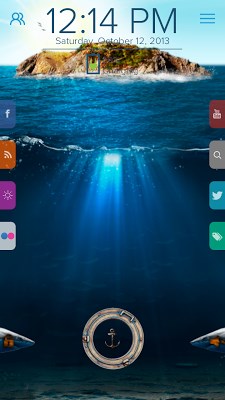
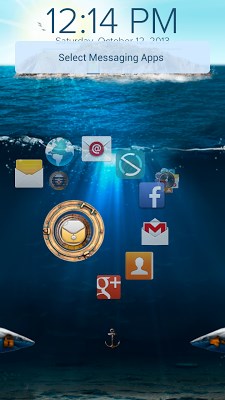
Have you ever wanted to take a break from your stressful day and surround yourself in silence? We have the perfect solution for you. The sea is a place of serenity and relaxation. With the new “Deep Sea” theme you can be there as much as you’d like simply by looking at your home screen. Try it out !
Looking for a lockscreen app? Forget anything you know about lock screens. Download Start and get ready to be amazed!
Start is a next-generation start screen. Start gives you quick access to everything that matters to you from your start screen. Start connects with facebook, twitter, flickr, Youtube, local weather forecasts, photo gallery, and a host of news providers using RSS feeds to make your start screen really yours.
It’s easy, it’s cool and it saves you a lot of time. To make Start even more fun, we have designed hundreds of FREE themes for you to choose from.
We know how much you care about your battery life so we’ve designed Start not to drain it. To give you maximum peace of mind, Start works perfectly with your native phone security.
With Start you can:
• Enjoy excellent performance with no delays
• Easily launch up to 24 apps of your choice or just let our smart algorithm set it automatically for you
• On Screen quick access configuration with a long press
• Stream your social media feeds with a single swipe
• Launch the camera and any related app
• Call/text/email your friends and family without unlocking your phone
• Get your favorite content from hundreds of sources
• Select your favorite theme or use your own personal picture as a background
• Chose and configure our widgets e.g. date, time and battery meter
• Switch between ring/vibrate/mute and unlock your phone with cool sliders
Email us at support+android@celltick.com.
Looking for a lockscreen app? Forget anything you know about lock screens. Download Start and get ready to be amazed!
Start is a next-generation start screen. Start gives you quick access to everything that matters to you from your start screen. Start connects with facebook, twitter, flickr, Youtube, local weather forecasts, photo gallery, and a host of news providers using RSS feeds to make your start screen really yours.
It’s easy, it’s cool and it saves you a lot of time. To make Start even more fun, we have designed hundreds of FREE themes for you to choose from.
We know how much you care about your battery life so we’ve designed Start not to drain it. To give you maximum peace of mind, Start works perfectly with your native phone security.
With Start you can:
• Enjoy excellent performance with no delays
• Easily launch up to 24 apps of your choice or just let our smart algorithm set it automatically for you
• On Screen quick access configuration with a long press
• Stream your social media feeds with a single swipe
• Launch the camera and any related app
• Call/text/email your friends and family without unlocking your phone
• Get your favorite content from hundreds of sources
• Select your favorite theme or use your own personal picture as a background
• Chose and configure our widgets e.g. date, time and battery meter
• Switch between ring/vibrate/mute and unlock your phone with cool sliders
Email us at support+android@celltick.com.
Size : 1.1M
Current Version : 4.0
Requires Android : 2.2 and up
Current Version : 4.0
Requires Android : 2.2 and up


Specially designed for GO Launcher EX. Want an extreme makeover for your phones?
Try it now!
Notice
1. Please make sure you have installed GO Launcher EX V2.58 and GO Locker V1.12 or above.
2. Click Menu>Plugins>GO Locker, choose a theme you like and apply it to your phone.
Thank you for your continued support. Any advice or suggestion is appreciated.
Feel free to contact us if you have any problems or suggestions.
Try it now!
Notice
1. Please make sure you have installed GO Launcher EX V2.58 and GO Locker V1.12 or above.
2. Click Menu>Plugins>GO Locker, choose a theme you like and apply it to your phone.
Thank you for your continued support. Any advice or suggestion is appreciated.
Feel free to contact us if you have any problems or suggestions.
Size : 4.2M
Current Version : v1.0
Requires Android : 2.0 and up
Current Version : v1.0
Requires Android : 2.0 and up


S5 Theme : Install this theme right away and get in contemporary style. Themes support following launchers:
1.APEX
2.NOVA
3.ADW
4.ACTION
This S5 theme is compatible with both phones & tablets
To get this awesome theme , please follow the below steps:
*Tap on S5 theme app icon
*Tap on apply theme
*Choose the launcher
Users can change the wallpapers directly from the app icon, please follow the below steps:
*Tap on S5 theme icon
*Tap on wallpaper
*Choose the wallpaper for the background
Users can download our more application from more apps icon, please follow the below steps:
*Tap on S5 theme icon
*Tap on more
*Choose the app you want to download from play store
Rate This Application!!
Must Do Before Installing this application :-
Please leave a feedback on our email (badroboapps@gmail.com) in case of any problems with this S5 theme.
The theme has been extensively tested on all the major handsets including Samsung,HTC, LG, Motorola,Sony.
Important Notification:-
This free app is advertisement supported.
1.APEX
2.NOVA
3.ADW
4.ACTION
This S5 theme is compatible with both phones & tablets
To get this awesome theme , please follow the below steps:
*Tap on S5 theme app icon
*Tap on apply theme
*Choose the launcher
Users can change the wallpapers directly from the app icon, please follow the below steps:
*Tap on S5 theme icon
*Tap on wallpaper
*Choose the wallpaper for the background
Users can download our more application from more apps icon, please follow the below steps:
*Tap on S5 theme icon
*Tap on more
*Choose the app you want to download from play store
Rate This Application!!
Must Do Before Installing this application :-
Please leave a feedback on our email (badroboapps@gmail.com) in case of any problems with this S5 theme.
The theme has been extensively tested on all the major handsets including Samsung,HTC, LG, Motorola,Sony.
Important Notification:-
This free app is advertisement supported.
Size : 6.9M
Current Version : 1.1
Requires Android : 2.3.3 and up
Current Version : 1.1
Requires Android : 2.3.3 and up


Brief Introduction
Little flowers and little grass, to give you a warm feeling .
Notice:
GO launcher theme is only available for phones with GO Launcher EX installed.
Search “GO Launcher EX” on Google Play Shop and install it for free.
***How to Apply the Theme
1. Directly open the theme after successful installation.
2. or back to Menu>Theme, choose a theme you like and apply it to your phone.
***How to Change Wallpaper
Click Menu>Wallpaper, and select the wallpaper you like.
***How to Change App Icons
(Some devices might not automatically apply the icons)
Long press some app icon>Replace>Theme’s icon, and then choose the icon you like.
Thank you for your continued support. Feel free to contact us if you have any problems or suggestions.
Little flowers and little grass, to give you a warm feeling .
Notice:
GO launcher theme is only available for phones with GO Launcher EX installed.
Search “GO Launcher EX” on Google Play Shop and install it for free.
***How to Apply the Theme
1. Directly open the theme after successful installation.
2. or back to Menu>Theme, choose a theme you like and apply it to your phone.
***How to Change Wallpaper
Click Menu>Wallpaper, and select the wallpaper you like.
***How to Change App Icons
(Some devices might not automatically apply the icons)
Long press some app icon>Replace>Theme’s icon, and then choose the icon you like.
Thank you for your continued support. Feel free to contact us if you have any problems or suggestions.
Size : 1.5M
Current Version : 1.0
Requires Android : 2.0 and up
Current Version : 1.0
Requires Android : 2.0 and up


Developer spend a lot of time in this project, so we’ll appreciate it if You buy the donate version.
This is a launcher theme for GO / Nova / ADW / Apex / Atom / Holo Launcher and more! It change the graphics and add high definition icons for many popular launcher replacements! The icons are rendered for high density Android devices (136×136) to give you increased clarity.
This is a launcher theme for GO / Nova / ADW / Apex / Atom / Holo Launcher and more! It change the graphics and add high definition icons for many popular launcher replacements! The icons are rendered for high density Android devices (136×136) to give you increased clarity.
Features
. Over 420 icons!
. Original MIUI v5 font included!
. Original MIUI v5 wallpapers included
. 5 custom backgrounds for every icon that isn’t included yet
. App drawer adapted
. MIUI v5 folder design included
. Various launchers are supported!
Todo list new appdrawer icon
. support appdrawer icon for all launchers (at the moment only supported in Go Launcher Ex)
. support wallpaper for all launchers (at the moment only supported in Go Launcher Ex)
. include donation button
. Fix folder background
. Rework GO Launcher elements
Notes
. More icons are due to be added to the iconpack over time. Do you see missing icons in your app drawer? Please send us an E-Mail!
. The theme will be updated every sunday!
. Icons may also work with mxHome, Launch-X, Crazy Home Lite, dxTop Lite, Open Home paid, Open Home free, VTL Launcher, Circle Launcher Paid, Nemus Launcher, Launcher Pro, Next Launcher and more!
. If you are having trouble -EMAIL US! Seriously, send us an email and help us to help you.
DESIGNED FOR XHDPI. YOUR RESULTS MAY VARY WITH OTHER SCREEN RESOLUTIONS
Credits
. DCStudi0 for the template
. MIUI Android v5 Miro Icons Expansion at xda-developers.com
. Over 420 icons!
. Original MIUI v5 font included!
. Original MIUI v5 wallpapers included
. 5 custom backgrounds for every icon that isn’t included yet
. App drawer adapted
. MIUI v5 folder design included
. Various launchers are supported!
Todo list new appdrawer icon
. support appdrawer icon for all launchers (at the moment only supported in Go Launcher Ex)
. support wallpaper for all launchers (at the moment only supported in Go Launcher Ex)
. include donation button
. Fix folder background
. Rework GO Launcher elements
Notes
. More icons are due to be added to the iconpack over time. Do you see missing icons in your app drawer? Please send us an E-Mail!
. The theme will be updated every sunday!
. Icons may also work with mxHome, Launch-X, Crazy Home Lite, dxTop Lite, Open Home paid, Open Home free, VTL Launcher, Circle Launcher Paid, Nemus Launcher, Launcher Pro, Next Launcher and more!
. If you are having trouble -EMAIL US! Seriously, send us an email and help us to help you.
DESIGNED FOR XHDPI. YOUR RESULTS MAY VARY WITH OTHER SCREEN RESOLUTIONS
Credits
. DCStudi0 for the template
. MIUI Android v5 Miro Icons Expansion at xda-developers.com
Size : 9.8M
Current Version : V1.5
Requires Android : 2.2 and up
Current Version : V1.5
Requires Android : 2.2 and up
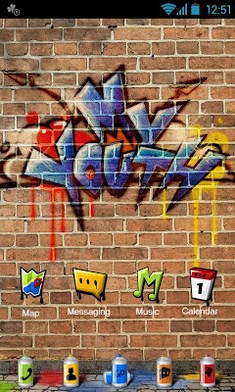
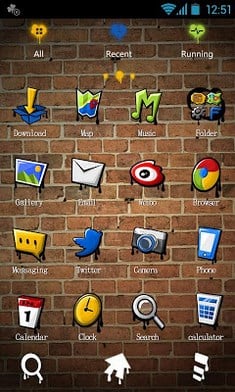
Here is a cool go launcher.This is my youth.
Brief Introduction
Specially designed for GO Launcher EX, provides delicate app icons, wallpapers, folder and app drawer interface. Get it right now and have a completely new makeover of your Android smartphone.
Notice:
GO launcher theme is only available for phones with GO Launcher EX installed.
Search “GO Launcher EX” on Google Play Shop and install it for free.
***How to Apply the Theme
1. Directly open the theme after successful installation.
2. or back to Menu>Theme, choose a theme you like and apply it to your phone.
Brief Introduction
Specially designed for GO Launcher EX, provides delicate app icons, wallpapers, folder and app drawer interface. Get it right now and have a completely new makeover of your Android smartphone.
Notice:
GO launcher theme is only available for phones with GO Launcher EX installed.
Search “GO Launcher EX” on Google Play Shop and install it for free.
***How to Apply the Theme
1. Directly open the theme after successful installation.
2. or back to Menu>Theme, choose a theme you like and apply it to your phone.
Size : 3.6M
Current Version : v1.0
Requires Android : 2.0 and up
Current Version : v1.0
Requires Android : 2.0 and up


